Table of Contents
Introduction
Creating a children’s activity book can look simple from the outside. You need some jokes, a few activities, illustrations, a cover and a properly formatted interior. But when you actually start building the book, the work quickly becomes more complicated.
You have to decide what goes on every page, keep the visual style consistent, create images, arrange the text, calculate the cover size and finally prepare the files for publishing.
GiggleDeck is a browser-based tool designed specifically around this process. Instead of creating a kids’ joke book completely from scratch, it takes a keyword and helps organise the book structure, prompts, visual style and final PDF assembly.
In this GiggleDeck Review 2026, we will look at what the software does, its key features, how it works, the role of ChatGPT, KDP-related features, pricing, limitations and who may find it useful.
Product Overview
| Product Name | GiggleDeck |
| Vendor | PintuBachhar |
| Pricing | $17.00 |
| Official Website | CLICK HERE |
| Main Audience | KDP publishers and printable sellers |
| OTO’s | Yes |
| Refund Policy | Sales are final, with a technical fix/refund promise if the tool will not run. |
The pricing and feature information above reflects the sales page currently available for the product and can change after the launch period.

What Is GiggleDeck?
GiggleDeck is a specialised tool for creating kids’ joke and activity books.
The basic concept is different from a normal AI writing application.
You do not simply ask an AI chatbot:
“Create a children’s joke book.”
Instead, GiggleDeck helps plan the complete book first. It creates the page structure and prompts that you can then use with your own ChatGPT account to generate the written and visual content.
The product page describes its main workflow as:
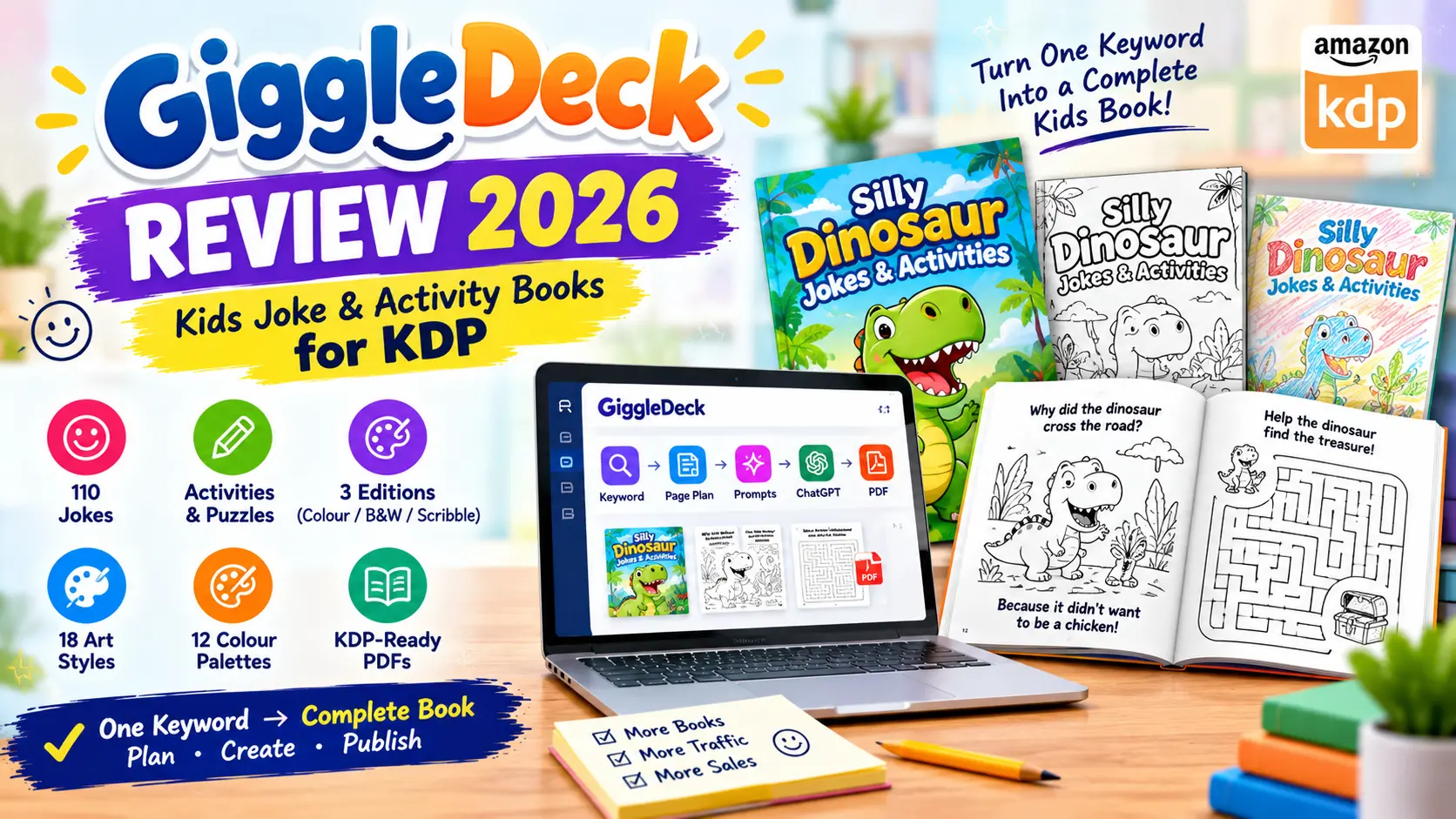
Keyword → Page Plan → Prompts → ChatGPT → Images → PDF
This approach is intended to reduce the repetitive planning and formatting work involved in creating a multi-page activity book.
🚀 Key Features of GiggleDeck
One Keyword Book Builder
One of the main ideas behind GiggleDeck is simplicity.
You enter a keyword such as:
- Dinosaurs
- Sharks
- Pirates
- Space
- Halloween
- Pizza
- Robots
The tool then uses that keyword to organise a complete joke and activity book around the chosen subject.
This can be useful when you already have a niche idea but do not want to manually plan every page.
35-Prompt Compiler
GiggleDeck includes what the sales page calls a 35-Prompt Compiler.
For the default 30-page workflow, the system prepares prompts covering the book’s content, visual style, individual pages and cover.
The important thing to understand is that GiggleDeck itself does not write and draw the final pages.
The generated prompts are used with ChatGPT, and ChatGPT performs the writing and image generation.
This distinction is important when evaluating the product.
🎨 Five-Colour Lock
Keeping an AI-generated book visually consistent can be difficult.
One page may look like a cartoon, while another may suddenly use a completely different style.
GiggleDeck attempts to reduce this problem through its Five-Colour Lock.
The system places specific colour values, art direction, line weight, border rules and lettering placement into the image prompts.
The sales page provides 12 different palettes, including options such as:
- Sunny Playground
- Jungle Pop
- Sherbet
- Deep Sea
- Storybook Warm
- Bubblegum Retro
- Cool Mint
- Desert Sunset
- Christmas Eve
- Pumpkin Night
- Spring Meadow
- Bedtime Blue
The goal is to make pages from the same book feel like they belong together.
🖌️ 18 Art Directions
GiggleDeck also offers multiple visual directions.
The listed styles include:
- Modern cartoon
- Gouache
- Classic storybook
- Cut paper
- Flat vector
- Watercolour
- Claymation
- Retro print
- 3D cartoon
- Comic panels
- Blueprint
- Educational outline
- Bold colouring line
- Doodle
- Engraving
- Wax crayon
- Coloured pencil
- Felt marker
This gives publishers more flexibility when creating different books.
📚 Three Different Editions
Another useful feature is the ability to create three versions from the same basic book plan.
Full Colour
Designed as a traditional colourful children’s book.
B&W Colouring
The black-and-white version uses closed shapes that children can colour.
Scribble
This edition is designed to have a hand-coloured appearance using effects such as crayon, coloured pencil or marker.
This means a single book concept can potentially be adapted into multiple editions without rebuilding the entire project from scratch.
📄 24 to 60 Page Books
GiggleDeck provides both automatic and manual settings.
According to the sales page, users can choose between 24 and 60 pages, with different numbers of jokes and activity pages. The largest setting can contain up to 336 jokes.
Manual controls include options such as:
- Page count
- Jokes per page
- Activity page count
- Reader age
- Language
- Book title
- Pen name
- Trim size
This gives experienced publishers more control than the automatic mode.
🧩 Activity Pages
GiggleDeck is not limited to simple joke pages.
The sample book shown on the sales page includes activities such as:
- Mazes
- Word searches
- Crack-the-code activities
- Spot-the-difference
- Match the punchline
- Would-you-rather activities
- Draw-your-own pages
- Riddles
The exact content depends on the selected book setup and keyword.
This can make the resulting book more interactive than a basic collection of jokes.
🌍 Multiple Language Support
GiggleDeck supports multiple languages.
The sales page currently lists 10 languages in the standard offering, including:
- English
- Spanish
- French
- German
- Portuguese
- Italian
- Dutch
- Indonesian
- Japanese
- Vietnamese
The Agency Pack expands the total to 34 languages.
The product page also says the jokes are generated natively in the selected language rather than simply translating English jokes. However, users should still review generated content carefully for cultural context, spelling and age suitability.
⚙️ How Does GiggleDeck Work?
The complete workflow is fairly straightforward.
Step 1: Enter a Keyword
Choose the topic for your children’s joke book.
For example:
Dinosaurs
GiggleDeck uses this as the starting point for the book structure.
Step 2: Choose Your Settings
You can use automatic settings or switch to manual mode.
Manual settings allow changes to page count, jokes per page, activities, age, language, title, pen name and trim size.
Step 3: Generate the Prompts
The 35-Prompt Compiler prepares the prompts needed for the book.
Step 4: Use ChatGPT
You copy the prompts into your own ChatGPT account.
This is where the actual joke writing and image generation take place. GiggleDeck itself does not call an AI API.
Step 5: Generate the Images
ChatGPT creates the artwork using the style information supplied by GiggleDeck.
Step 6: Add the Images Back
Once the images are ready, you place them back into GiggleDeck’s workflow.
Step 7: Build the PDFs
The software assembles the interior and cover files according to the selected settings.
💰 GiggleDeck Pricing
The current sales page shows:
Launch Price: $17 one-time
The listed regular price is:
$47
The page states that the launch price ends on September 26, after which the price is scheduled to return to $47.
The offer also includes two launch bonuses:
PinPress AI
A tool for creating Pinterest pins from the finished book pages.
The sales page lists 180 templates across 13 printable niches and AI-generated titles, descriptions and tags.
Lullabet
A personalised alphabet-book tool that creates name-based books with print-ready interior and cover files.
The sales page says these two bonus apps are included during the launch period and are removed from the offer afterward.
Always check the current sales page before purchasing because launch pricing and bonuses can change.
📜 Commercial Licence
According to the sales page, the commercial licence allows users to publish and sell the books they create.
The page specifically mentions platforms such as
- Amazon KDP
- Etsy
- Other marketplaces
However, there is an important restriction.
The app itself cannot be resold or redistributed. The licence covers the books produced with the tool, not redistribution of the software.
Therefore, buyers should read the current licence terms before using the product for client work or commercial distribution.
⚠ What is GiggleDeck Does NOT Do
This section is especially important because it gives a more balanced view.
According to the sales page, GiggleDeck:
❌ Does not write or draw the book itself
ChatGPT handles the actual writing and image generation.
❌ Does not guarantee perfect spelling
The vendor openly states that spelling mistakes can still appear inside generated artwork.
Users should check every page before publishing.
❌ Is not a full-page-layout editor
You cannot freely move every element around the page like you would in a traditional design application.
❌ Does not submit books to KDP
The publisher remains responsible for uploading the files and checking Amazon’s current requirements.
❌ Does not create every type of book
The current deck is specifically designed for kids’ joke and activity books.
These limitations make the product more specialised than a general-purpose publishing tool.
📊 GiggleDeck Pros and Cons
✅ Pros
- Simple keyword-based starting point
- Designed specifically for kids’ joke and activity books
- Automated page planning
- 35-prompt workflow
- Five-Colour Lock for visual consistency
- 18 art directions
- 12 colour palettes
- Three editions
- 24–60 page options
- Multiple language support
- KDP-orientated PDF assembly
- 300 DPI output
- Commercial licence
- Browser-based workflow
- No software installation required
- Launch bonuses included during the stated period
❌ Cons
- Requires your own ChatGPT account with image generation
- ChatGPT image limits can affect production speed
- Does not generate the content independently
- Generated artwork can contain spelling mistakes
- Limited to kids’ joke and activity books
- Not a full drag-and-drop page editor
- KDP approval is not guaranteed
- The current offer has a final-sale policy
- Users still need to proofread and inspect the finished files
👥 Who Is GiggleDeck Best For?
KDP Publishers
If you already publish children’s books on Amazon KDP and want a more structured workflow for joke and activity books, GiggleDeck may be relevant.
Printable Sellers
The generated PDFs can also be used for printable products, subject to the licence terms.
Children’s Activity Book Creators
The built-in activities make it more suitable for interactive joke books rather than simple text-only books.
Beginners With ChatGPT
People who know how to use ChatGPT but struggle with book planning, image consistency and PDF assembly may find the workflow easier to follow.
Who Should Probably Skip It?
If you want a general AI writing tool, a complete graphic-design application or a system that creates everything without ChatGPT, GiggleDeck may not be the right fit.
The vendor itself makes this limitation clear on its sales page.
Frequently Asked Questions
❓ Can I create multiple books?
Yes. The sales page says there is no book-count metering. Users can change the keyword and build another book.
❓ Can I sell the books?
According to the sales page, the commercial licence covers publishing and selling books created with GiggleDeck. It does not allow users to resell or redistribute the GiggleDeck application itself.
❓ Can I create colouring books?
Yes. One of the three editions is specifically a B&W colouring edition.
❓ Are the files ready for KDP?
GiggleDeck creates files at the listed trim sizes and calculates the cover geometry and spine. However, users should still inspect the final files through KDP’s own previewer.
❓ Can I get a refund?
The current sales page says all sales are final. It separately states that if the software technically will not run in the user’s browser, the vendor will fix it or provide a refund.
🔎 Final Verdict
GiggleDeck is a specialised publishing workflow tool, not a general AI writing or design platform.
Its main purpose is to simplify the repetitive parts of creating children’s joke and activity books: planning pages, preparing prompts, maintaining a consistent visual style and assembling the final PDFs.
The strongest part of the workflow is the combination of the 35-Prompt Compiler, Five-Colour Lock, multiple editions and built-in PDF assembly.
But there are also clear limitations. You still need your own ChatGPT account, the AI-generated artwork needs proofreading, KDP requirements remain your responsibility, and the current deck is limited to kids’ joke and activity books.
For someone already interested in children’s KDP publishing and looking for a structured workflow, GiggleDeck is worth investigating. For someone expecting a completely independent AI book generator that writes and illustrates everything without another AI service, the product may not match those expectations.
The best approach is to check the current pricing, licence, ChatGPT requirements and KDP guidelines before making a purchase.